History : Watched
| Event DateEvent Age | Played | Label (Profile) | Episode | Quality | Size | Delete |
|---|---|---|---|---|---|---|
| 0 Bytes | ||||||
|
Media marked watched or unwatched will list in this space |
||||||
| General help | |
|---|---|
|
Filters are saved per layout. Examples;
|
|
|
The above table is sorted first by played and then by date of event (i.e. watched/unwatched) |
|
|
To multi-select checkboxes or column headers, click then hold shift and click |
|
|
Key for Delete column;
|
|
|
To find how much freespace a delete will yield, the size tally increases for selected episodes that have a media file |
|
|
A mapping in the client notification section is needed for results if a player library folder is different to a parent folder |
|
|
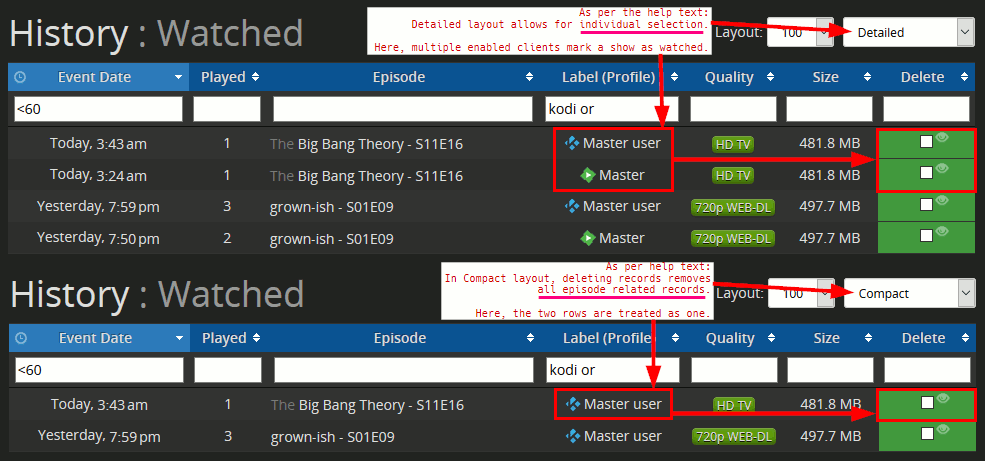
In Compact layout, deleting records removes all episode related records. Detailed layout allows for individual selection [Show me] |
|
|
Any script can add to the watched list by making a documented API call to |
|
| Supported clients | To use |
 Kodi Kodi
Matrix and newer builds Episodes marked watched or unwatched are pushed in real-time and shown above. |
Oct 2022: Replace "/kodi/" with "/kodi-legacy/" in the following guide for Leia, Krypton, Jarvis, or Isengard In Kodi media player;
|
 Emby Emby
Episode watch states are periodically fetched and shown above. |
|
 Plex Plex
Episode watch states are periodically fetched and shown above. |
|